How to Manage Your Email Notifications
This guide outlines how to configure the email notifications you receive from your Calpace account, giving you control over all platform-related communications.
Accessing Notification Settings
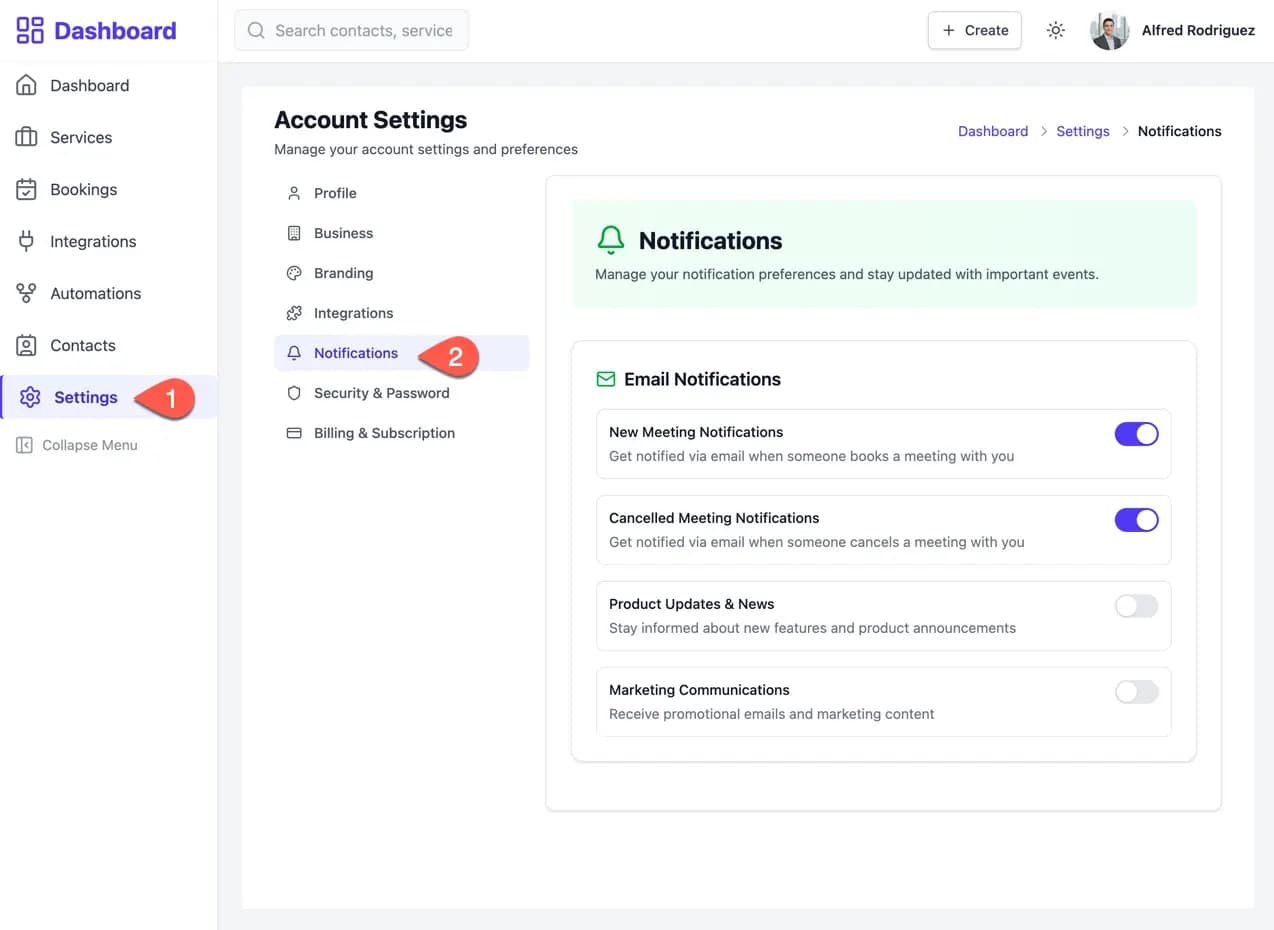
- From your main dashboard, navigate to Settings in the left-hand menu.
- In the "Account Settings" menu, select the Notifications tab.
Configuring Email Preferences
On the Notifications page, you can manage the types of emails you receive from the Calpace platform.
Use the toggle switch next to each item to enable or disable it. A blue toggle indicates the notification is active, while a grey toggle indicates it is inactive. Your changes are saved automatically.
Notification Types:
- New Meeting Notifications
- Controls email alerts for when a client books a new meeting with you.
- Cancelled Meeting Notifications
- Controls email alerts for when a client cancels an existing meeting with you.
- Product Updates & News
- Manages communications regarding new platform features, improvements, and product announcements.
- Marketing Communications
- Manage the delivery of promotional content, special offers, and other marketing-related emails.